
Slotaza Casino with Four Registration Steps and a Bonus Choice
The details entered when signing up may become important months later. Email is used to recover a forgotten password, personal information is checked against identity documents, and the registered address helps establish who owns the profile. An overlooked mistake can therefore cause difficulties long after the form has been submitted, particularly when requesting a withdrawal or trying to regain access.
At Slotaza Casino, there is another detail worth knowing before getting started. The first decision comes before any personal information is entered: players choose between casino gaming and sports betting, then select a welcome offer. The form opens only after these choices have been made. Understanding the available options beforehand is particularly useful for anyone intending to claim an introductory promotion.
Choosing a Section and Welcome Offer
Clicking Join opens the Choose Your Welcome Bonus screen, with two categories: Casino and Sports. This initial selection determines which promotions appear next.
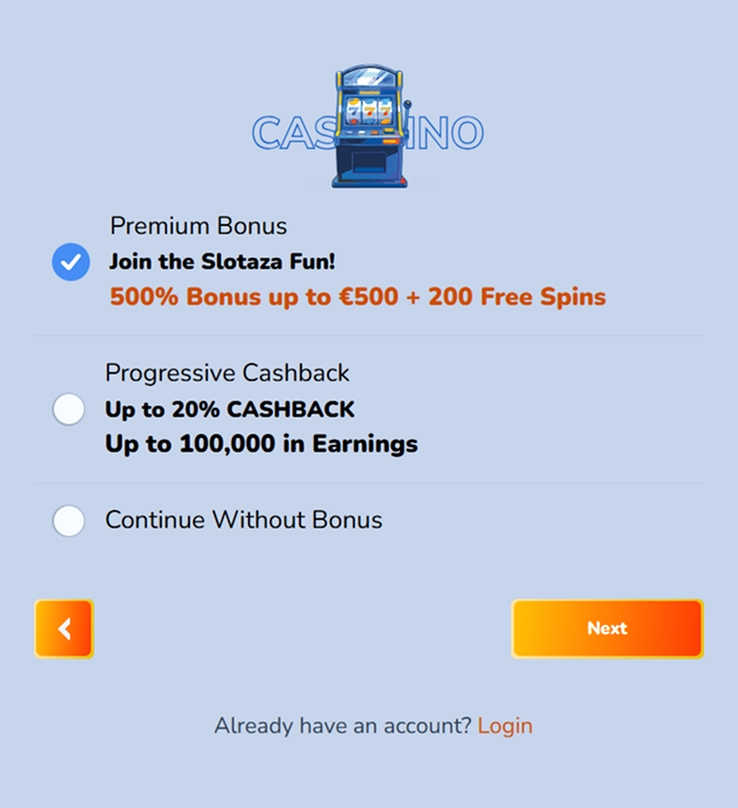
There are three options for Casino. Premium Bonus includes 500% up to €500 and 200 Free Spins, while Progressive Cashback offers returns of up to 20% under the programme’s terms. The third option, Continue Without Bonus, allows players to proceed without an introductory incentive.
Sports betting has a separate Kick Off Welcome Package, offering free bets worth up to €110.
The distinction matters from the first deposit. Premium Bonus carries wagering requirements, whereas Progressive Cashback follows a different calculation method. Players select one option rather than receiving both together.
Declining a welcome offer does not prevent someone from signing up. Continue Without Bonus is available directly on the selection screen.
Casino and Sports belong to the same site. The initial choice determines the type of introductory promotion, not whether two separate profiles are created.
What Information Is Needed to Create a Profile?
The main form asks for contact details, a password and information about the player. It is best to use accurate details from official documents, as these may be checked during identity verification.
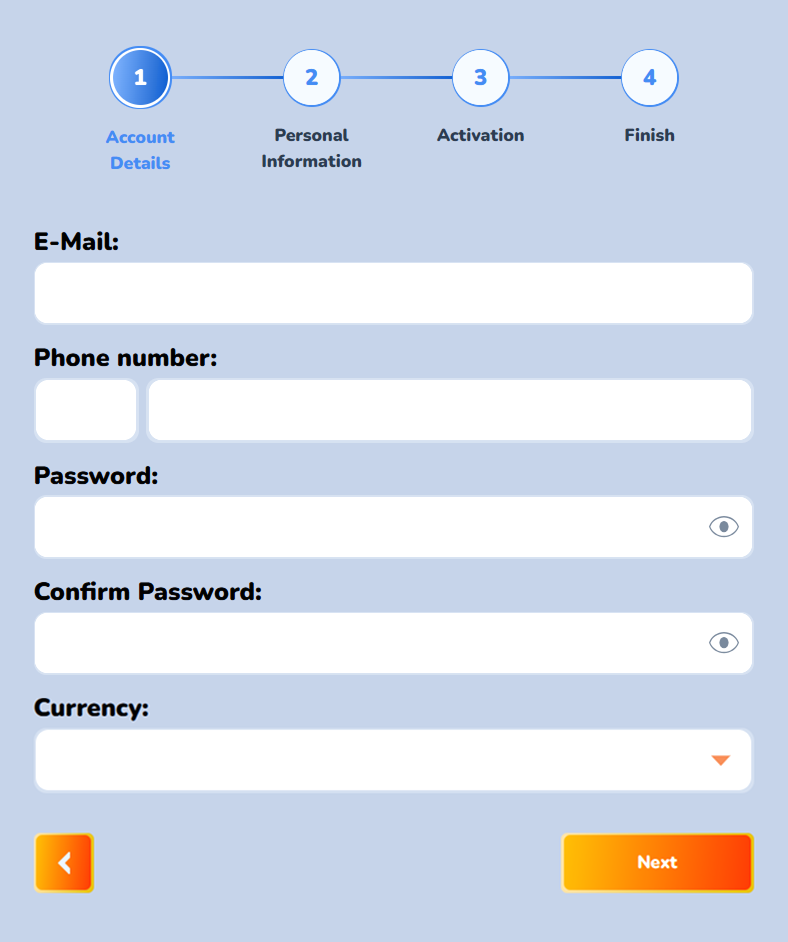
The first screen requires an email address, a telephone number with an international dialling code, a password and its confirmation. It also contains the Currency field, where GBP is available for UK customers.
The email address deserves particular attention. It serves as the login identifier, receives verification messages, enables password recovery and provides a contact point for customer support. A typing error could cause problems before the form has even been completed.
A telephone number is also required, although email remains the main identifier for signing in. When entering a UK number, it is important to select the correct international dialling code and check the remaining digits.
Name, Date of Birth and UK Address
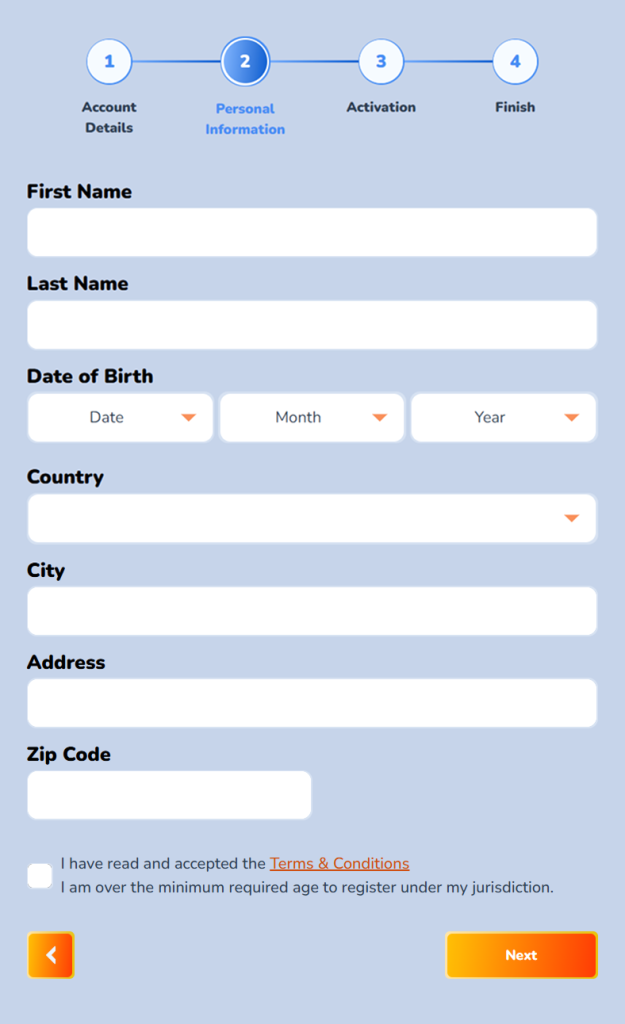
The personal information section asks for a first name, surname, date of birth, country, town or city, residential address and postcode.
Names should be entered as they appear on the player’s identity document. This helps avoid discrepancies during subsequent verification.
A full residential address and postcode are also required. Both must be accurate, as they may be checked when confirming the player’s identity.
The country of residence is selected separately. It should reflect where the person actually lives, since this forms part of their personal information.
At the end of the form, users must accept the Terms & Conditions and confirm that they meet the minimum age requirement. For players in the UK, this is 18.
How to Complete the Four Stages from Join to Finish
Slotaza Casino Registration consists of four stages. Contact details and personal information are entered on separate screens, with the current stage displayed at the top.
- Account Details. After selecting a welcome offer, the player enters contact information, creates a password and chooses a currency.
- Personal Information. The form collects the player’s name, residential address and date of birth. Acceptance of the Terms & Conditions is also confirmed here.
- Activation. The email address is verified through a message containing a confirmation link.
- Finish. The process is completed, after which the player can sign in.
During the initial stages, it is possible to return to the previous screen. If a mistake is noticed before everything is finalised, correcting it immediately is the better option.
For example, someone who has selected the wrong currency should return to Account Details before submitting the form. The ability to change Currency independently afterwards is not described, so this check should not be left until later.
Once the process is complete, users sign in with their email address and password. There is no need to create a separate username.
Email Verification and Secure Access
Email remains the main way of identifying the player. It is used both for initial activation and for recovering a forgotten password.
During Activation, a message containing a verification link is sent to the address provided. Opening it completes the necessary confirmation.
If the message does not appear in the inbox, it is worth checking the Spam or Junk folder. Email providers sometimes move messages from unfamiliar senders there automatically.
Another possible cause is a typing error. An incorrectly entered address means the verification message will be sent to a different mailbox.
The general terms do not explain how long the link remains valid or whether another can be requested. If difficulties arise, it is best to contact support and explain that the process has stopped at Activation.
Signing In and Resetting a Password
The Login button opens the usual sign-in form, where players enter their email address and password.
Access through Google, Facebook or other social services is not supported. The registered mailbox is therefore particularly important, as it is also used to reset forgotten passwords.
To recover access, the player enters their email address and receives a link for creating a new password. The published information does not mention a separate SMS reset procedure.
If access to the mailbox has also been lost, assistance from customer support will be necessary. In this situation, the operator may request additional information to verify the player’s identity and ownership of the profile.
A strong password should not be reused on other websites. In particular, it should differ from the one protecting the associated email address.
What Becomes Available After Signing Up?
Once the process is complete, players can use their personal area, where financial settings, individual offers and profile management tools are located.
Financial transactions are handled through Cashier. This section displays the available deposit and withdrawal methods and provides access to related functions.
Some promotions appear only after signing in. For example, Cashier includes More to Discover, a selection of personalised offers that may depend on the player’s activity.
Completing the form does not, however, activate every promotion automatically. Deposit-based schemes require a payment, while other incentives have their own eligibility conditions.
Making an initial payment is not a compulsory part of signing up. A funded balance will nevertheless be needed for real-money betting.
Using the Same Details on Different Devices
Someone who initially signed up on a computer can use the same credentials on a smartphone. There is no need to complete the form again.
Safari can be used on an iPhone, while Chrome or another up-to-date browser is suitable for Android. The mobile form follows the same main stages as the desktop version.
The personal area, Cashier and gaming sections can all be opened on a phone. If preferred, the site can also be added to the Home Screen through the browser menu.
There is no separate native app for creating a profile, so installation files are unnecessary.
Identity Verification Before Withdrawals
Providing personal details is only the first part of identifying a player. Before approving withdrawals, the operator requires KYC checks.
These are used to compare the submitted information against official documents and establish that financial transactions are being carried out by the rightful owner.
Verification may involve an identity document, proof of address and information about the payment method.
For UK players, a passport or driving licence may be suitable for identity verification. A bank statement or utility bill can generally serve as proof of address, provided it meets the operator’s requirements.
The exact list of documents depends on the individual verification request.
Why Details May Not Match the Documents
Suppose a player enters a shortened version of their name, while their passport shows the full version. During KYC, the operator may ask them to explain the difference.
A similar situation can arise from an incorrect date of birth or residential address. Even if the original form was accepted, discrepancies may be discovered later.
Personal information should therefore be corrected through the existing profile and customer support, rather than by creating a second one.
If documents are requested, players should use the submission method specified by the operator. There is no need to provide additional personal information unnecessarily.
How to Resolve Sign-Up Problems
Not every error requires starting the entire process again. The first step is to identify where the difficulty occurred.
| Issue | What to Do |
|---|---|
| Unable to proceed to the next stage | Check the required fields, data format and acceptance of the terms |
| Password is not accepted | Make sure the password and confirmation match |
| Email address is already in use | Try signing in or recovering access to the existing profile |
| Activation email has not arrived | Check the spam folder and contact support if the message is still missing |
| An error in personal details is discovered afterwards | Ask customer support how to correct the information |
Particular care is needed if a profile has already been created but access has been lost. Signing up again with a different email address will not restore the funds or transaction history associated with the original one.
If the problem concerns the chosen currency, a new profile should not be created without first seeking advice. The possibility of changing financial settings after the initial process needs to be confirmed with the operator.
Contacting Customer Support
Live Chat is available for immediate enquiries. Customer support can also be contacted at [email protected].
The operator asks players to write from the email address provided when signing up. This helps staff match the enquiry to the correct person.
If the problem concerns the form, it is useful to identify the stage where the error occurred and describe any message displayed by the system.
Additional information may be required to verify identity when recovering access. Passwords and one-time verification codes should never be shared with support staff.
General information about the site, its gaming sections and financial terms is available on the main page.